

Last Updated on 07/21/2011 by Chris Gampat

Wireless flash control is perhaps one of the biggest upgrades that your photography can take as it allows you to control the light nearly anywhere you so choose to go. There are photographers out there that oftentimes say that they choose not to use flash at all because it disturbs their subjects. While this can be true, the argument can be made that you’d much rather get a good photo of them—in which wireless flash can help tremendously. When used correctly, it will also not tamper with the wonderful colors that your camera’s sensor is capable of capturing. You shouldn’t be afraid to learn how to light, so here’s a bit of a walkthrough.
Editor’s Note: before I go on, we’re working on Wireless Flash postings for other systems as well. This is part of the revamp that the site is going through. Gevon is working on a Nikon wireless flash posting as I type this.
What is Wireless Flash Control

Wireless flash control is the act of controlling one or a number of flashes from one device. The flashes may be controlled in groups and at different ratios.
There are a couple of terms that one will have to familiarize themselves with when diving into the world of the strobist.
Master- The master is the unit that triggers the other flashes (slaves) to go off. At the time of writing this posting, the cameras that have master control built into them are the 7D

The 580 EX II

Slave- The slaves are a group (or groups) or flashes controlled by the master. Slaves will all fire together as long as the infrared blinker on the front of the flash is facing towards the master. These flashes can be set to automatically adjust their own metering (ETTL II) or to fire in a ratio of some sort.
The 430 EX II
Groups- Canon allows flashes to fire in three different groups: A, B, and C. These groups allow the flashes in each individual group to be controlled accordingly.
Ratios- Ratios can be a bit confusing but with some practice and seeing what they can do, it will become much easier. According to Photonotes.org, (my notes are in italics)
* A ratio of 1:1 would mean that the flash unit is the sole source of light (0 ambient + 1 flash) and therefore you wouldn’t have a fill flash situation. (This means that there is no light whatsoever and the flash is the only light that will be there. Think of your flash as a lightbulb that is being switched on and off super quickly and how that will affect your photo.)
* A 2:1 ratio would mean that the ambient light and flash are at the same level (1 ambient + 1 flash). That basically means 0 stops of compensation given a fairly flat-lit scene, and usually results in rather unnatural looking fill flash. (A case like this is rare to be quite honest with you and I’ve never encountered it.)
* A ratio of 3:1 means that there is twice as much light from the ambient source as the flash (2x ambient plus 1 of flash). Such a ratio requires a -1 stop fill flash setting on the flash unit, since each stop means a doubling or halving of the amount of light. (This happens often when actually shooting indoors with lots of light coming in from the windows or other areas.)
* A ratio of 5:1 means that there is four times as much light from the ambient source as the flash (4x ambient plus 1 of flash). This is a -2 stop difference. Typically photographers use between 1 and 2 stops of fill flash to lighten shadows without creating a phoney flash-illuminated look. (Best used outside when shooting wedding photos of the bride and the sun is behind her. That is if you don’t have a reflector of some sort to bounce the light off.)
Before going on read all the above very carefully and familiarize yourself with it.
ETTL II- From Photo.net, “E-TTL II is much like E-TTL except that the focus distance returned by the lens may, in some circumstances, be used in determining flash exposure. Since E-TTL II is a camera body based modification of E-TTL, all E-TTL capable speedlites can also operate in E-TTL II mode when used with an E-TTL II compatible body.”
In layman’s terms, it’s your auto mode. It is your friend.
Sync Speed- This is the fastest shutter speed that your flash can fire at without having problems like the shutter being partially caught in the exposure. This has happened to me previously when using totally manual flash, but only when I was still with Olympus.
Why Should I Use Wireless Flash
– Better photos with more creative effects
– You’ll be worrying about light a lot less in darker situations
– Keeping the ISOs down
– Gets rid of shadows on people’s faces, or at least softens them and makes them more flattering
– More professional looking photos
– High speed photography
– Illuminating details that are otherwise hard to see
The Flashes
430 EX II– I have one of these. The 430 EX II is the perfect budget flash for those of you that want to get your feet wet in the world of flash photography. It is also useful for the photographer that doesn’t use flash often but when they do, they will need a powerful and more compact body. The 430 EX II is capable of acting as a slave that my 7D can fire off at will.
580 EX II– This is Canon’s most powerful and most used flash. The reason for this is because of the built in bounce card, further head tilting abilities, and the larger output power coupled with the larger head. It can control other flashes and has a different control layout than the 430 EX II.
If you’d like a book, pick up Understanding the Canon Speedlite 580EX II/430EX II
ST-E2– This isn’t a flash, but an infrared transmitter that will aid in autofocusing and also aid in controlling and triggering the flashes. With ST-E2 attached, my 5D Mk II
The Cameras
At the moment of writing this guide, the Canon 7D and 60D are currently the only cameras in Canon’s lineup capable of wireless flash control. The cameras are capable of firing the flashes are a ratio, to work together as one unit, or to just trigger the off-camera flashes (and not be seen in the photo.) The video below will explain it better detail.
How To Do It
Before I get into my explanation, here’s a quick video:
If you’re still confused, let’s go through this step by step in images and text. I’ll be using my 430 EX II and my 7D to demonstrate this.
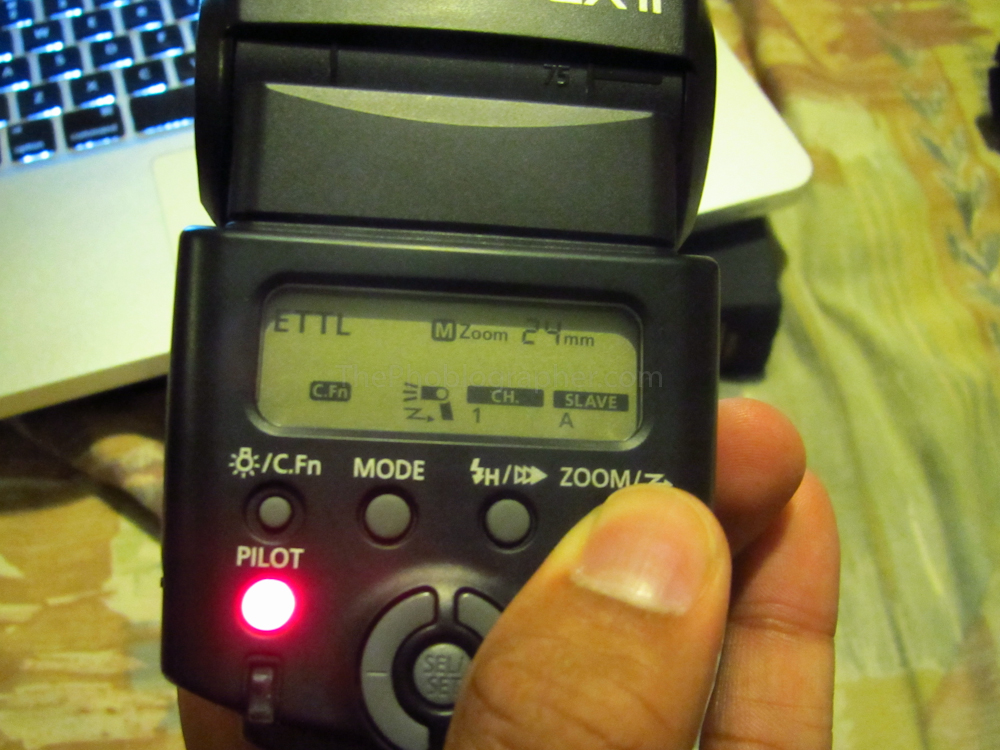
To set your 430 EX II into slave mode, press and hold down the Zoom button until you see it set into slave mode on the back.
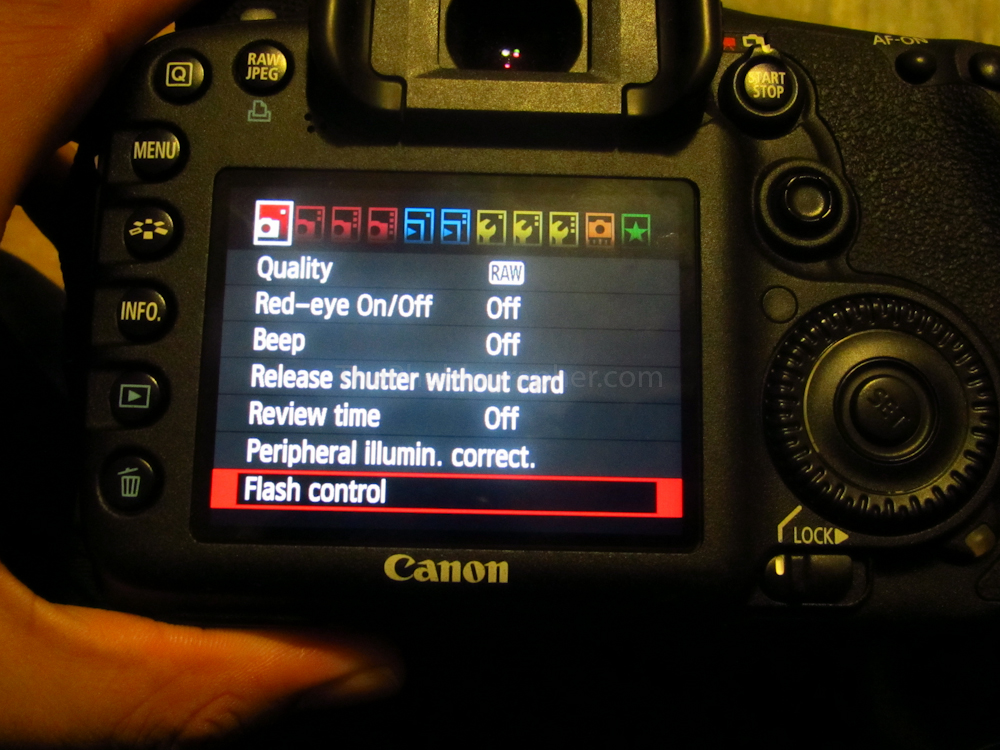
In my Canon 7D‘s menu, I find and enter the Flash Control sub-menu.
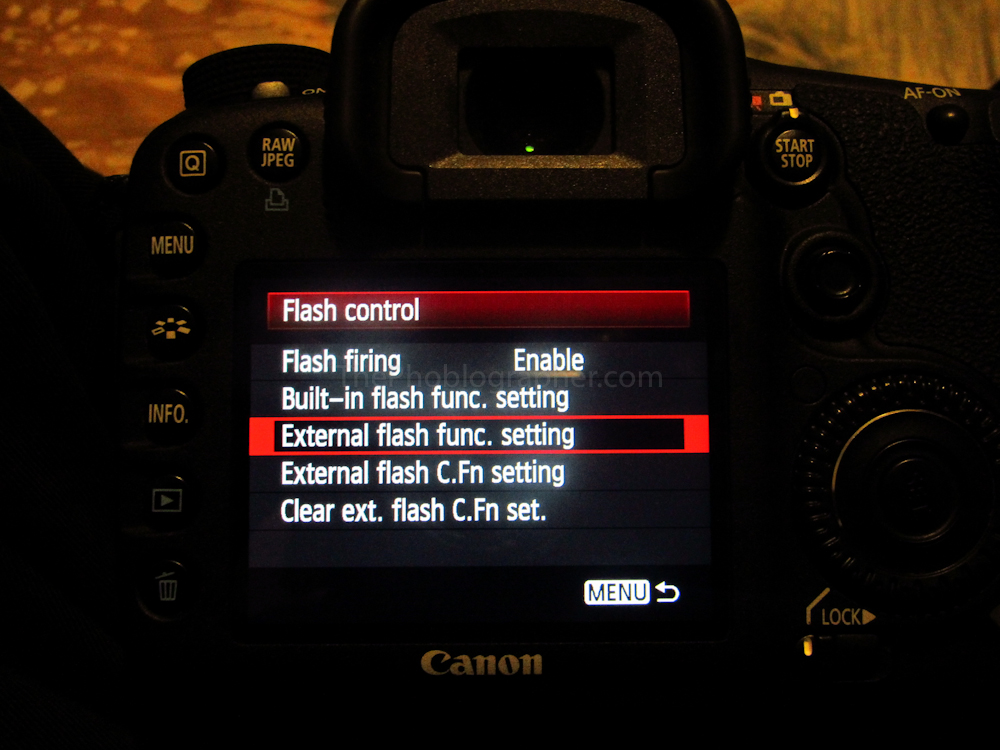
Go down to Built-in flash func. setting
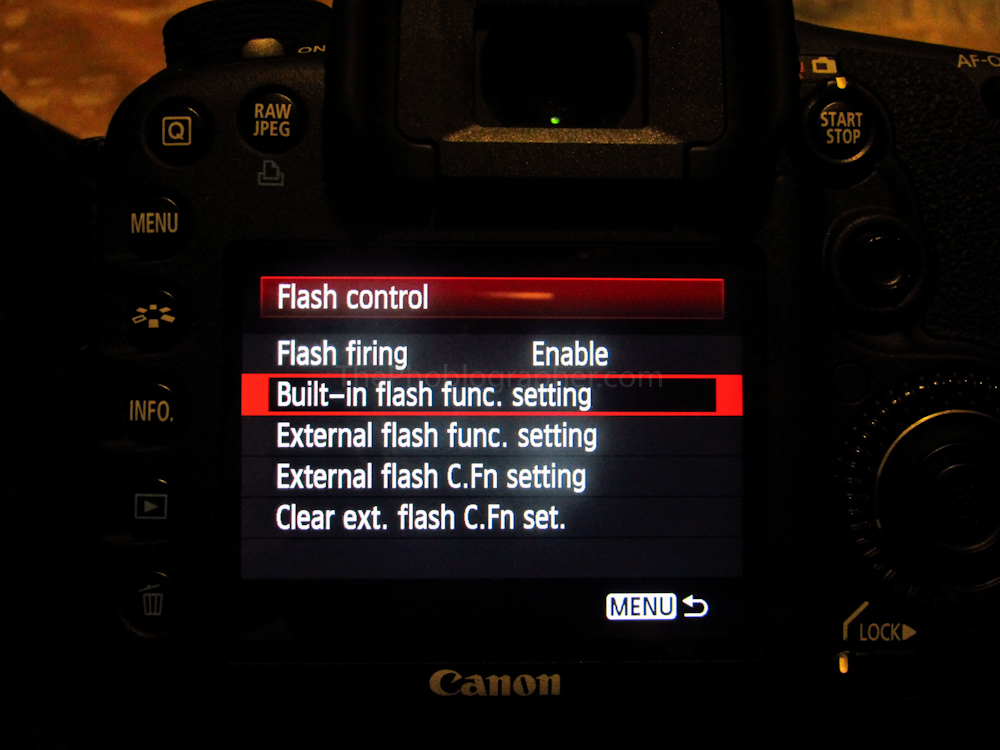
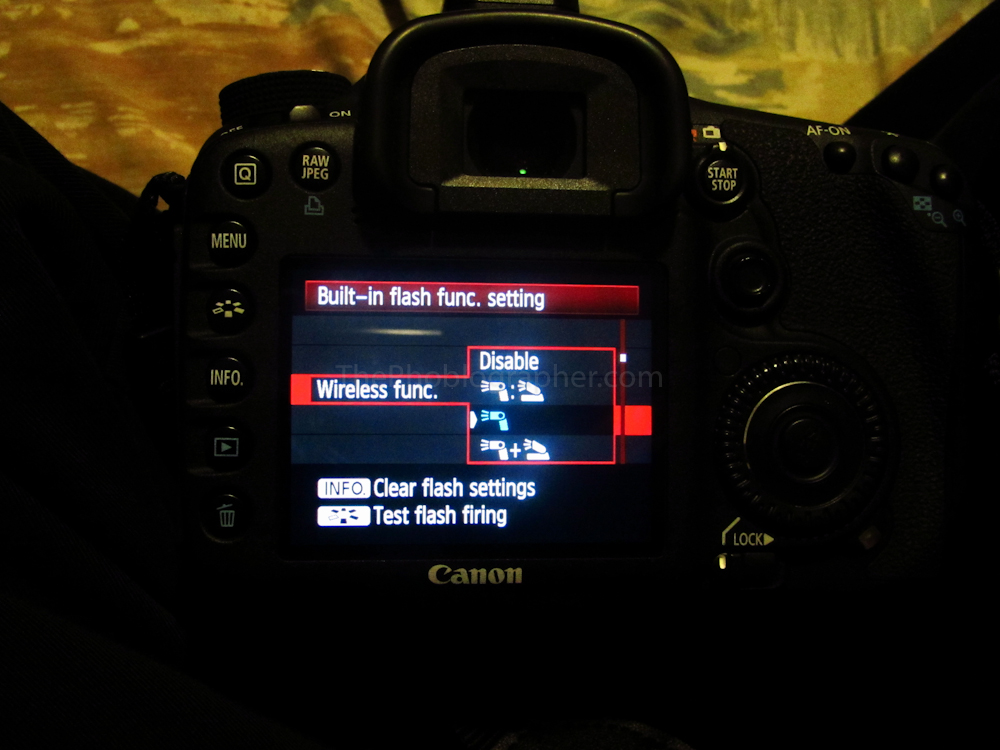
Go down to wireless flash and choose the setting I want.
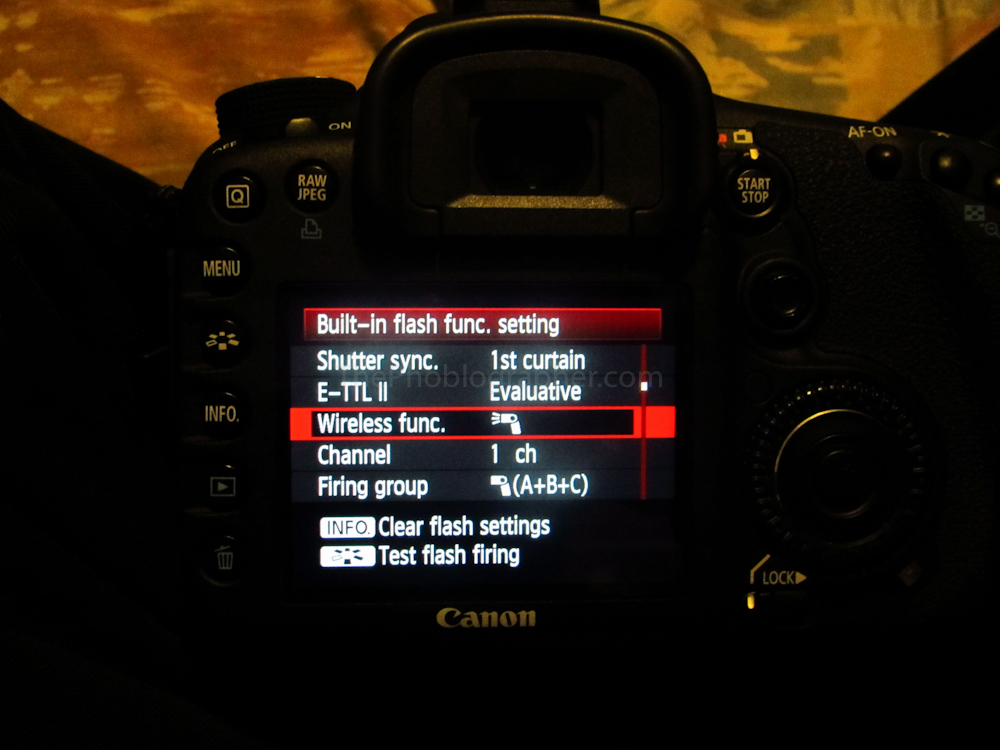
As a point of reference: the symbol on the left is for your off-camera flash. Notice how it looks like the head at the side and light is coming out. The symbol on the right is your on-camera pop-up flash. Notice how it looks like it’s coming off of something and emitting light.
The first setting is ratio control. The second being control of only your off-camera flash though your on-camera flash will fire just to set it off. The third setting is where the two act together to illuminate your subject.
I’m at the point to where I look at what I’m shooting and visually judge how much light I’d want to illuminate my subject. After that, I go down to the exposure compensation control and dial in the according settings. Sometimes I use this, but I’m also bad with numbers so don’t always have the time to figure out calculations and so trial and error (lots of it) has taught me to do it by eyeballing the subject.
Now I ensure that the flash is popped and I shoot.
Please Support The Phoblographer
We love to bring you guys the latest and greatest news and gear related stuff. However, we can’t keep doing that unless we have your continued support. If you would like to purchase any of the items mentioned, please do so by clicking our links first and then purchasing the items as we then get a small portion of the sale to help run the website.
Also, please follow us on Facebook, Flickr and Twitter.
Get rid of the ads!
Did you enjoy reading this article as much as we enjoyed writing it? There's a way to support us and our reporting, getting ad-free navigation and more as a bonus. Subscribe to us for less than a coffee per month —just $3.99— or take advantage of our yearly subscription with a hefty discount for only $25.- An ad-free experience
- A free mystery box for Lightroom or Capture One
- All the books in our store
- 20% discount on Capture One
- 30% discount on Imalume Photo Theft Protection
- 20% off Herbs and Kettle Tea Company.
- 20% off your order from MPIX printing services.
- 5% off Viltrox Products via their eCommerce store.
- 10% off all film developing, printing and scanning services from Blue Moon Camera and Machine
- 15% off 7Artisans products: The lens and accessory maker is offering a sweet discount for Phoblographer's readers.