

Last Updated on 12/30/2012 by Chris Gampat
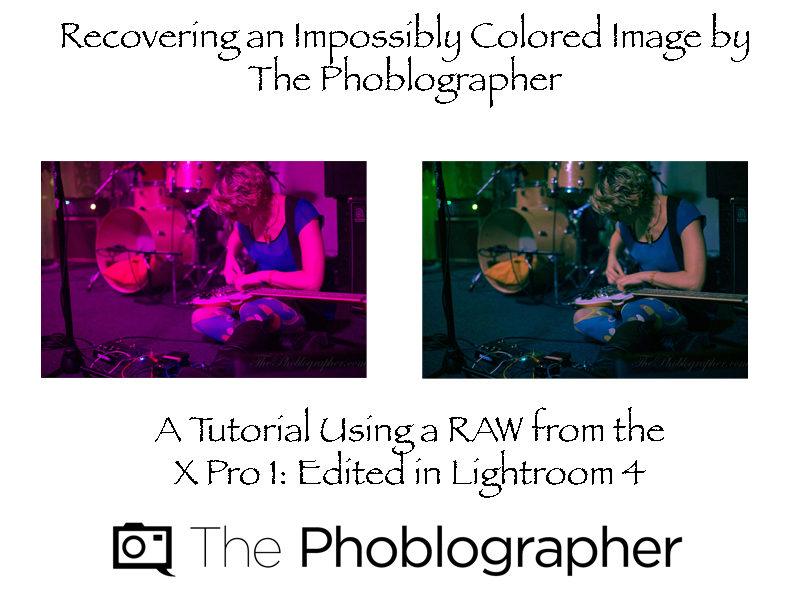
After my Fujifilm X Pro 1 review, people asked me about how I edited and recovered an impossibly colored image (which I think just sounds cooler than severely discolored.) In all honestly, it is color theory. But here is a video I made about how to do it if you don’t have that knowledge.
Gear Used
These photos were shot with the Fujifilm X Pro 1 mated with the 35mm f1.4 X series lens. They were then imported into Adobe Lightroom 4 to be edited on a 13 Inch MacBook Pro Retina.
How It’s Done
Images



Please Support The Phoblographer
We love to bring you guys the latest and greatest news and gear related stuff. However, we can’t keep doing that unless we have your continued support. If you would like to purchase any of the items mentioned, please do so by clicking our links first and then purchasing the items as we then get a small portion of the sale to help run the website.
Also, please follow us on Facebook, Flickr and Twitter.
Get rid of the ads!
Did you enjoy reading this article as much as we enjoyed writing it? There's a way to support us and our reporting, getting ad-free navigation and more as a bonus. Subscribe to us for less than a coffee per month —just $3.99— or take advantage of our yearly subscription with a hefty discount for only $25.- An ad-free experience
- A free mystery box for Lightroom or Capture One
- All the books in our store
- 20% discount on Capture One
- 30% discount on Imalume Photo Theft Protection
- 20% off Herbs and Kettle Tea Company.
- 20% off your order from MPIX printing services.
- 5% off Viltrox Products via their eCommerce store.
- 10% off all film developing, printing and scanning services from Blue Moon Camera and Machine
- 15% off 7Artisans products: The lens and accessory maker is offering a sweet discount for Phoblographer's readers.