

Film scanning tools are a rare bunch for most analog photographers. There are a few options, but those that are free and open source, along with good color science, are hard to come by. To help with this conundrum, a young creator has innovated a tool that can help one to convert their color negative film into accurate positives. And all of this is for free.
Posted on Reddit’s r/AnalogCommunity, Kevin Lyu revealed FreeCCR, an app that helps to convert scanned color negative film into accurate positives. The app is designed around a physics-based pipeline that models how film actually responds to light. This includes non-linear density curve, dye characteristics, and overall density range.
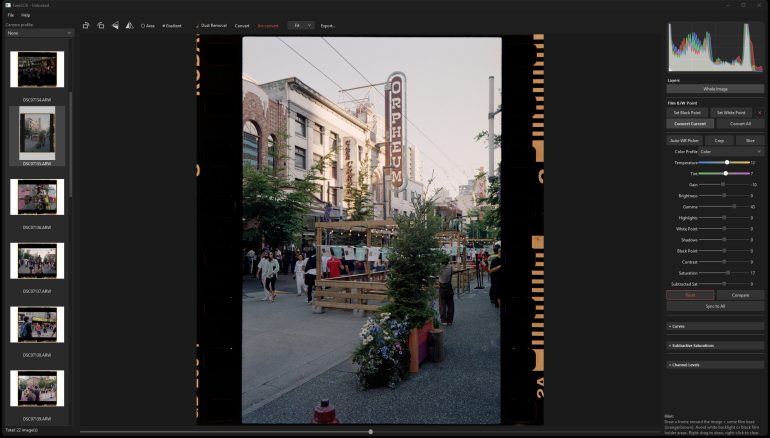
The app’s core is called B/W Point, which asks the user to sample two physical reference points directly from the scan: the fully exposed film stock and the clear film base beside the frame. This also helps to convert the negatives the same way, no matter how bright or dark the scene was. Some of the features also include:
- Physics-based conversion models how film actually responds to light, not just a simple pixel invert.
- Two-point anchoring helps to sample white and black once, and the whole roll converts consistently.
- Auto mode works for quick automatic detection and conversion for a first pass.
- Batch processing works by loading a whole folder or roll at once. RAW (CR3, CR2, NEF, ARW, DNG) and standard formats (TIFF, JPEG, PNG) are supported.
- Full color correction can help fix temperature, tint, exposure, brightness, contrast, saturation, white/black points, with live histogram and zoom.
- Sync across frames allows one to copy and paste adjustments so a whole roll matches in seconds.
- GPU acceleration is an optional OpenCL support for faster processing.
- Fully offline feature allows for all local processing.
For scans that don’t have a usable leader, FreeCCR offers an Auto mode that analyzes each frame’s histogram independently for faster results.
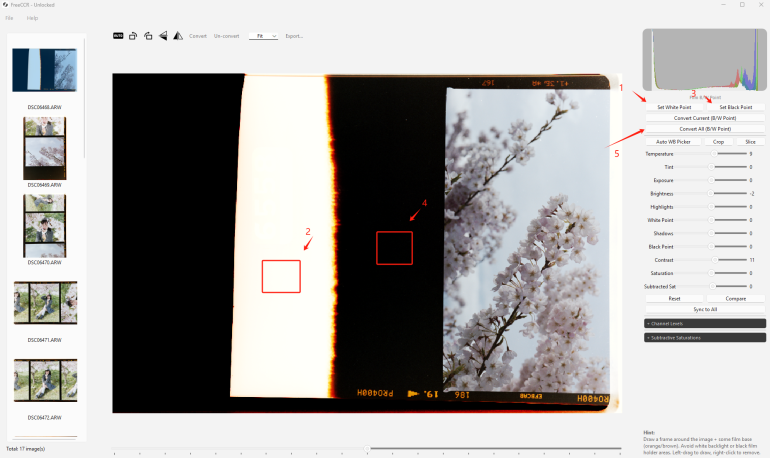
As part of their update, the app also includes a new AWB button, Linux support, and more updates on the dust-removal system:
- Dust healing can work on a (cropped) image rather than the full scan.
- Automatic dust detection has been improved. It scans the image in tiles at full resolution and uses a smarter brightness check, so it now catches soft, blurry dust specks that the old lower-resolution pass used to miss.
- Healing quality has been improved.
- Exports now use the exact reference frame captured at conversion time.
The app can be downloaded from GitHub and seems to have a simpler interface to work, as well. In fact, since it was introduced on Reddit, it has received some positive and some concerning comments. The latter was due to the fact that the coding was accomplished with the help of AI. However, with the former, as one person added:
I just gave this a shot with a couple random scans and I must say, this is the best “first impression” I’ve had with one of these tools. Consistently better results than some of the paid tools I’ve tried, too.
Given how the app can help analog photographers, and for free, it is worth giving a try. Perhaps, it becomes a tool that you can rely on without any hassle.
Get rid of the ads!
Did you enjoy reading this article as much as we enjoyed writing it? There's a way to support us and our reporting, getting ad-free navigation and more as a bonus. Subscribe to us for less than a coffee per month —just $3.99— or take advantage of our yearly subscription with a hefty discount for only $25.- An ad-free experience
- A free mystery box for Lightroom or Capture One
- All the books in our store
- 20% discount on Capture One
- 30% discount on Imalume Photo Theft Protection
- 20% off Herbs and Kettle Tea Company.
- 20% off your order from MPIX printing services.
- 5% off Viltrox Products via their eCommerce store.
- 10% off all film developing, printing and scanning services from Blue Moon Camera and Machine