

Last Updated on 05/02/2026 by Chris Gampat
I know, the headline sounds click-bait-y but hear me out. Earlier this month, Adobe released a major update to Lightroom and Lightroom Classic that brings over a number of enhancements to the storied photo management and editing suite. From the addition of support for Sony a7V RAW files, Mood Boards, contextual search, and quality of life changes to AI-Assisted Culling and Denoise, there’s a lot to cover in this update. Yet, it still feels like Adobe is quietly killing Lightroom Classic.
What’s New for Lightroom and Lightroom Classic Users
The following feature updates were taken from the Adobe Lightroom Classic official release notes document:
Lightroom Classic Version 15.3
- Assisted Culling updates:
- The Reject section now offers improved handling of multiple reject reasons and greater control over exposure-related issues.
- Subject Focus scoring is now improved for images with shallow depth of field, especially when the subject is only partially in focus.
- AI edits updates:
- When exporting photos, you may see a new AI Updates Required dialog box if some selected images contain AI settings that need updating.
- Performance Improvements:
- Slider performance is now interactive for global and local edits.
- Better memory utilization for Full Screen Window.
- Experience improved Cloud sync download speed.
Lightroom Desktop
As above, the following was also taken from the Adobe Lightroom official release notes:
- Specify Edit in Photoshop settings before editing your Lightroom photos in Photoshop.
- Assisted Culling can now better handle images shot with shallow depth of field, reducing false rejections of photos with intentional background blur. The reject filter is now more accurate across a wider range of scenarios, and a new slider gives you finer control over how strictly exposure issues are flagged.
- Create separate XMP and ACR sidecar files for raw images in the Local tab.
- Experience faster Presets, Profiles, and Distraction Removal panels.
- The White balance previews are now improved.
- Critical bug fixes and known issues.
Both Lightroom and Lightroom Classic also got a few new features by way of full support for Sony’s a7V RAW files (about time), a series of film-inspired presets, and the ability to use Firefly to create shareable Mood Boards.
Of these, the most pedestrian of the three is the added support for the Sony a7V’s RAW files. For those keeping score at home, the Sony a7V has been available for purchase since December of 2025 and has only in the last couple of months gotten limited file support on Adobe’s Lightroom products. Until now, you’ve largely had to rely on Sony’s clunky Imaging Edge Desktop application to convert the ARW files into TIFFs before importing into your Lightroom Catalog. It’s a pain for sure and if you’re a Sony a7V owner, you’re probably relieved to see this included in this update.
Film-Inspired Presets
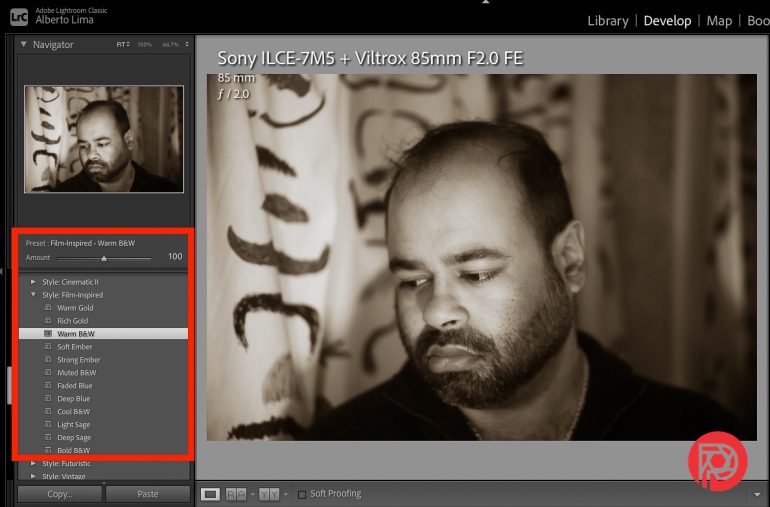
That “film look” continues to be popular and Adobe definitely recognizes it with the addition of these presets. Adding to their baked-in creative filters, the 12 Film-Inspired (that’s their official name) can be found under the Style category in your preset library. Of these 12 presets, I’m drawn to the Warm Gold, Soft Ember, and Light Sage variants as they skew warmer in tone.

Above is a SooC reference photo which you can compare to the 12 presets below:


Performance Upgrades and Adobe’s AI-Powered Tools
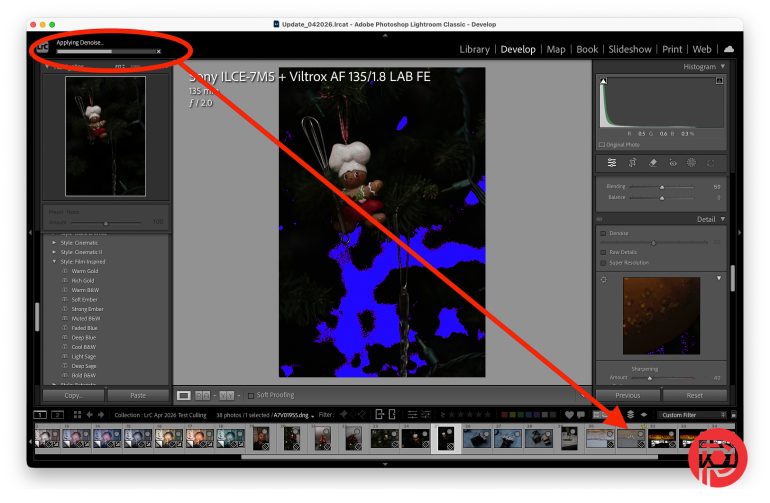
As noted in the release notes, both Classic and Desktop versions of Lightroom also got improvements to some AI tools including AI-Assisted Culling and the AI-powered Denoise. Starting with Denoise, in the past applying AI-powered Denoise would result in a pop-up dialog box that prevented you from doing anything further until the process was complete. This was especially painful if you had multiple edits to work through, beyond the image with lots of noise. While this update doesn’t allow you to keep editing the file(s) simultaneously as the Denoise effect is being processed by Lightroom, it does at the very least allow you to select another image to keep working (shown above). This seems like a minor tweak, but one that I can appreciate as it helps keep your workflow moving.
This specifically is a really fascinating update as most cameras these days don’t have significant issues when it comes to high ISO output.
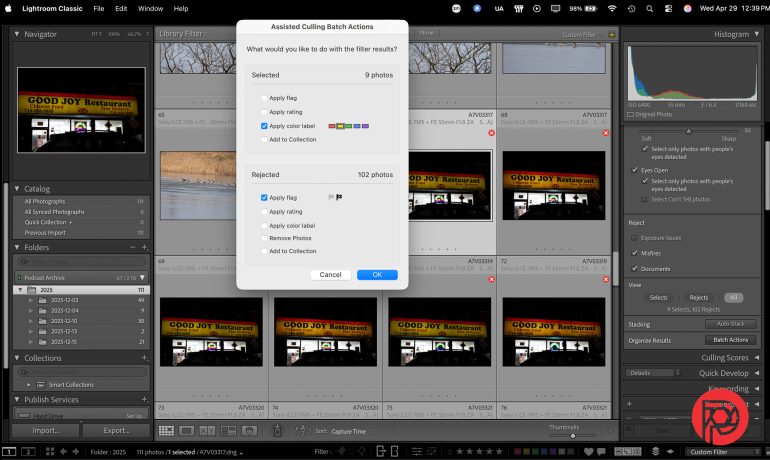
Speaking of speeding up workflows, AI-Assisted Culling also got some needed boosts including improvements to the AI’s accuracy, as well as improved sliders to adjust Subject Focus scores and the new options under the Reject section that allows you to select the reasons why an image might be rejected – including Exposure Issues, Misfires, and Documents. In theory, these new options can help whittle down images that you’d like to pass, by but in practice, AI Culling still needs a lot of work. While some images were rightly rejected due to exposure issues, night scenes and creative filters will throw off Lightroom’s ability to distinguish between keepers and missed shots. If nothing else, this just reinforces my bias that humans are still crucial to the editing process.
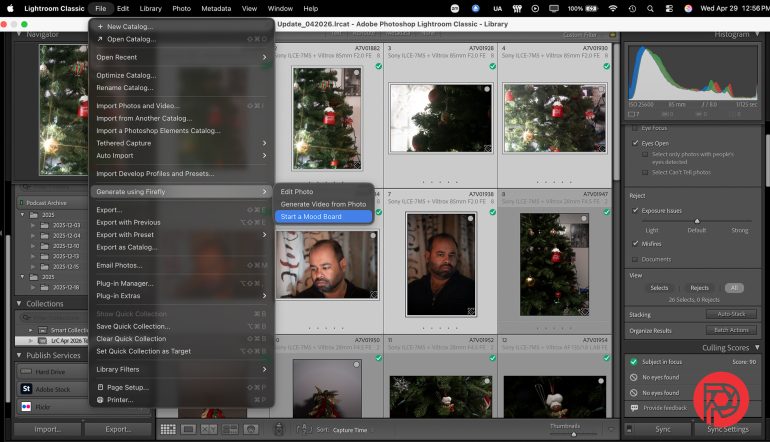
With this latest update, Adobe introduces something that you may already be using if you’re a VSCO Pro subscriber – Mood Boards. Not everyone needs a mood board, and in my opinion, even fewer know how to properly use a mood board. But if you’re someone who’s ever wanted to put together a visual road map for your next project, a mood board is something that you’ve at least looked up. Adobe brings the ability to create mood boards using the Firefly integration within Lightroom. The process couldn’t be simpler: select the images that you’d like to start from, right-click to bring up the menu, and select “Generate using Firefly” then “Start a Mood Board” and you’ll be redirected to newly created Firefly.Adobe website where your board lives. From there, you can add additional images, use Firefly to search for or generate new images (AI), or use one of available presets to build/customize your mood board.
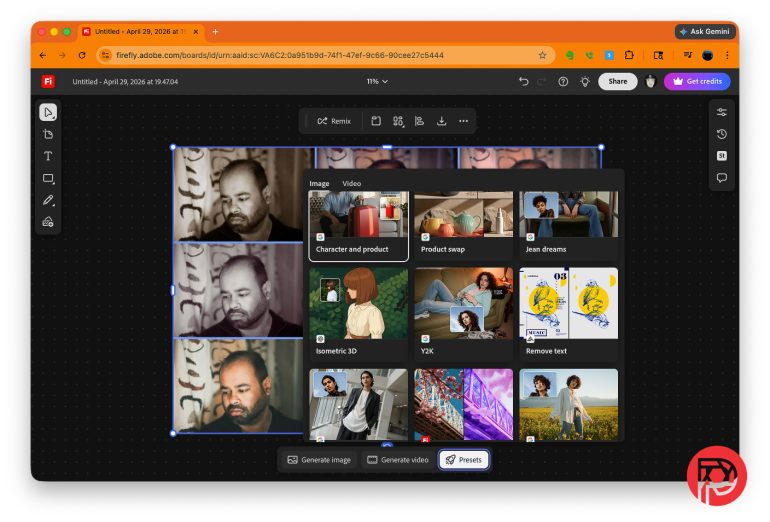
Honestly, the Mood Board feature isn’t all that different from what VSCO already offers – I’d go one step further and say they do it a little better, but they’ve also had VSCO Canvas out in the wild for over a year now. My biggest gripe with the Mood Board feature in Adobe is that they don’t do much to teach newer photographers – those who’d most likely be intrigued by this add-on – how to make use of a Mood Board. If Adobe is reading this, here’s an opportunity to create a tutorial that goes into the “why” of mood boards rather than a quick tour of what tools are available in the mood board (which you force everyone to take when they create a mood board for the first time).
From our standpoint, this seems really fascinating to think about: Adobe saw VSCO and decided that they’d come after them.
What was this Talk About the Death of Lightroom Classic?
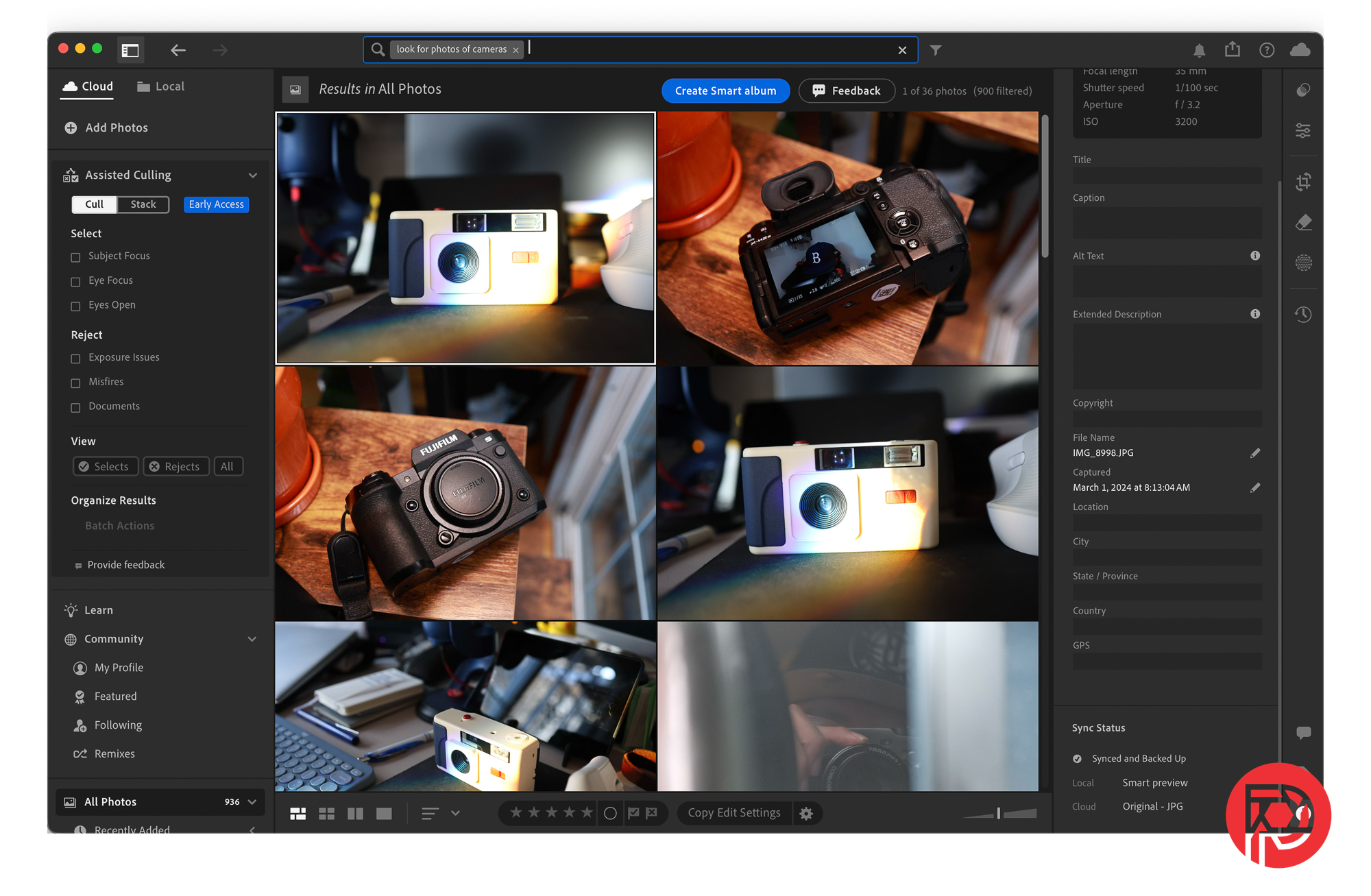
The death of Lightroom Classic feels imminent with this update as well. It’s true that Adobe has not made any official announcement stating this but this latest update and the direction these two versions seem to be headed all point to that unceremonious end. One of the biggest new features in this update is the ability to contextually search all of the photos that have been uploaded to the cloud using Lightroom (Mobile or Desktop). While Lightroom Classic does allow for syncing of your catalog to Adobe Cloud, you will not be able to use contextual search.
This is absolutely puzzling to me, especially if you could potentially sync catalogs to the cloud, it stands to reason that you should be able to do this if not something similar in Lightroom Classic.
It’s important to note that Adobe does not recommend switching between Lightroom and Lightroom Classic. And while I understand that most of the heavy lifting in Lightroom Desktop is tied to cloud syncing of your images, there shouldn’t be a reason why you couldn’t make that an option even from something like a Collection (i.e., have the collection sync to the cloud).
This decision feels like product differentiation for the sake of pushing people to one platform over another and ultimately forcing photographers to essentially pick version of the Lightroom experience they will work with. At the end of the day, you’ll have to make the decision between being able to build multiple catalogs or quality of life improvements like smarter searching of your images. Unless Adobe can explain to the contrary, this just feels like an afront to the professionals that need both the ability to create multiple catalogs and crave smarter tools to make their jobs easier.
Get rid of the ads!
Did you enjoy reading this article as much as we enjoyed writing it? There's a way to support us and our reporting, getting ad-free navigation and more as a bonus. Subscribe to us for less than a coffee per month —just $3.99— or take advantage of our yearly subscription with a hefty discount for only $25.- An ad-free experience
- A free mystery box for Lightroom or Capture One
- All the books in our store
- 20% discount on Capture One
- 30% discount on Imalume Photo Theft Protection
- 20% off Herbs and Kettle Tea Company.
- 20% off your order from MPIX printing services.
- 5% off Viltrox Products via their eCommerce store.
- 10% off all film developing, printing and scanning services from Blue Moon Camera and Machine
- 15% off 7Artisans products: The lens and accessory maker is offering a sweet discount for Phoblographer's readers.