

The Phoblographer

Photography: Think Simpler

Which Photo is the Better Edit?

with 18 comments

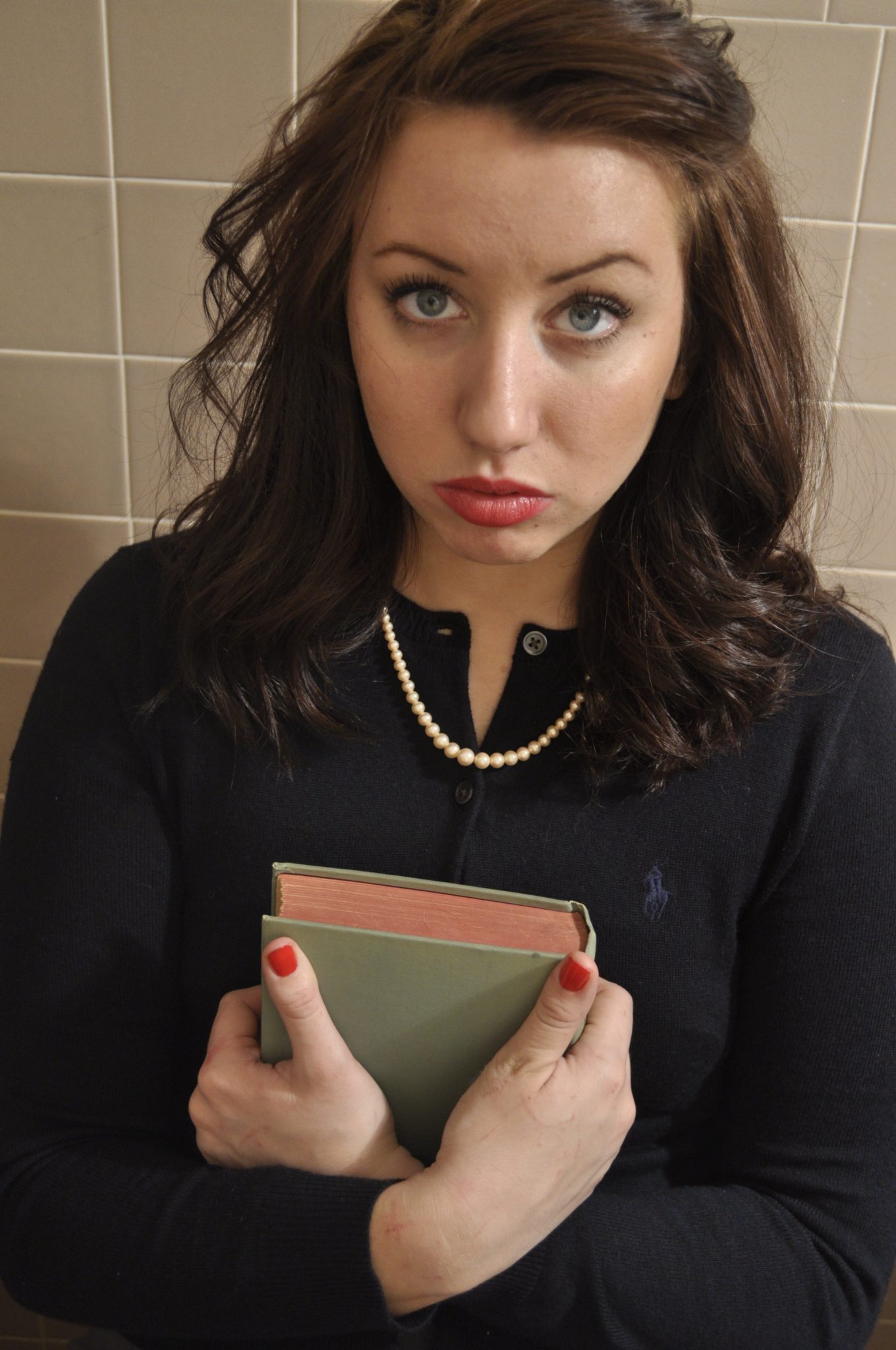
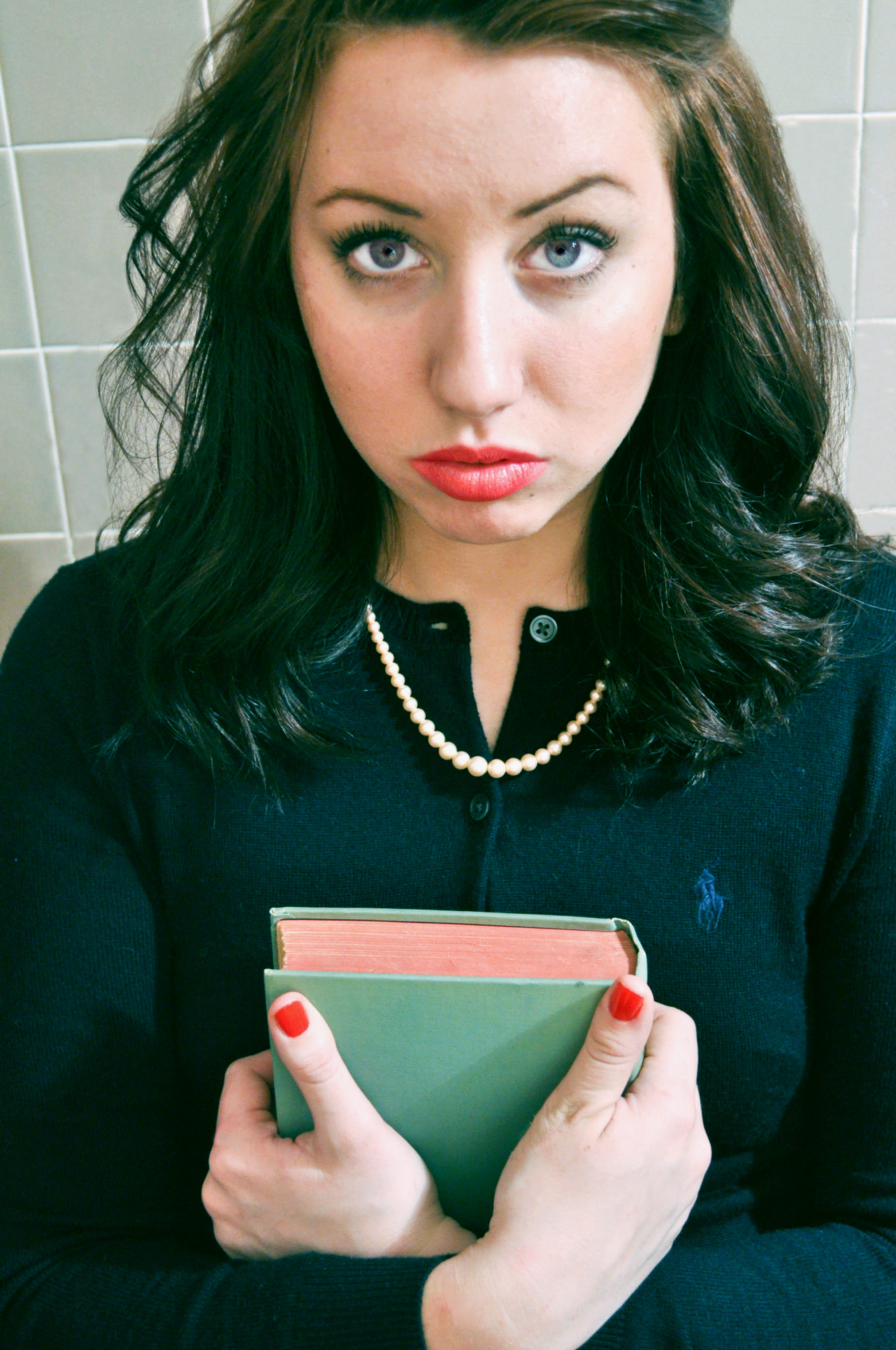
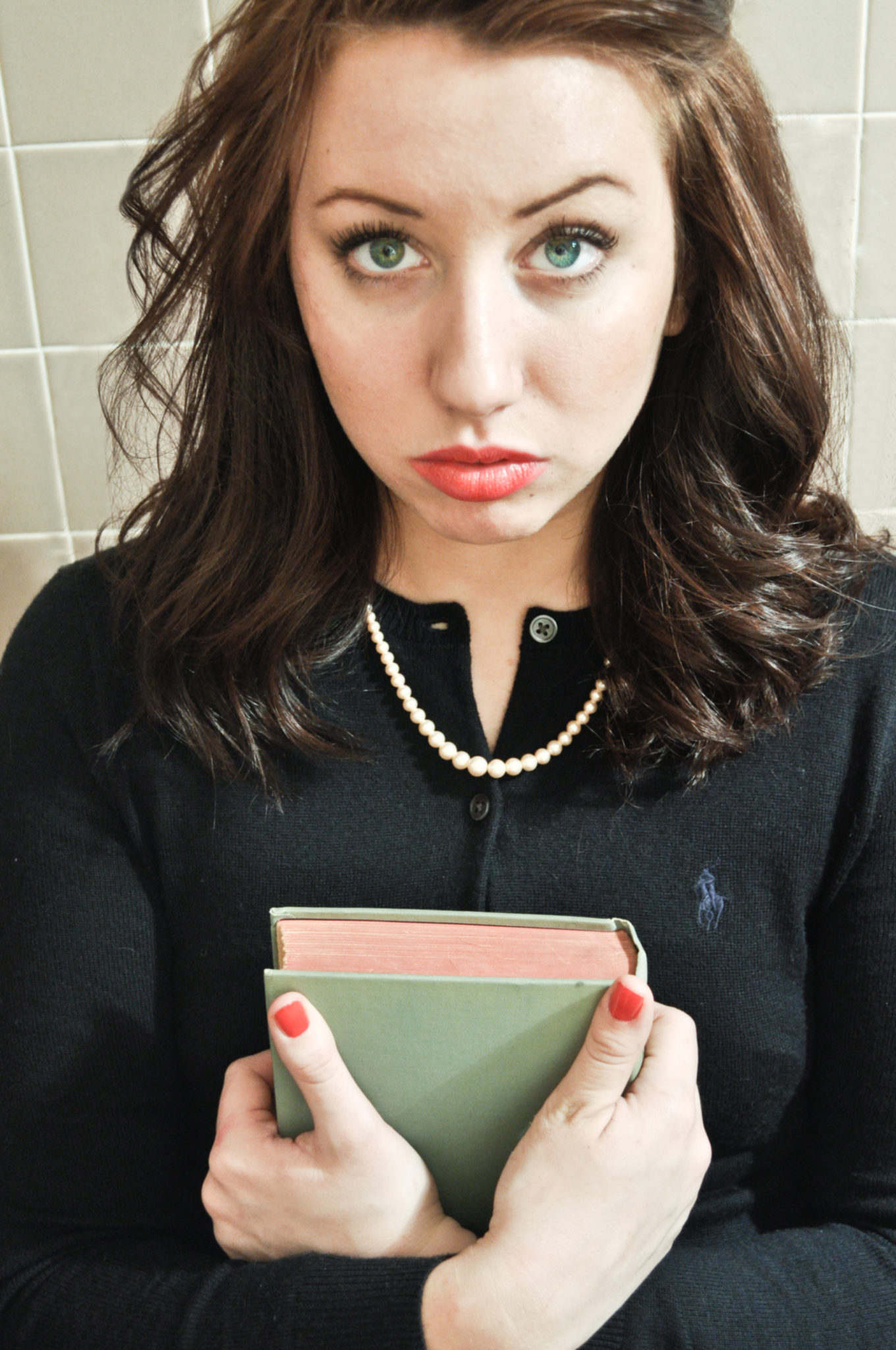
A friend of mine recently asked me to edit a photo that was shot of her. She wasn’t totally thrilled with the way the photographer edited the photo, so I thought I’d give it a shot myself. The opening photo is the original file, and here are two different versions of some quick edits that I did in both Photoshop Elements and Lightroom 3. This one was a bit tough because the photographer shot in JPEG, which immediately limits what I can do with the image vs shooting in RAW. As I’ve stated before, there is so much more information stored in a raw file.

To explain this a bit better think of:

- JPEGs as the prints from the film days that you picked up from Walgreens.

- RAW files are like the negatives, only digital. If you have the negative, you can do so much more with the final image.

Which one do you prefer? Let us know in the comments below and also let us know why you think so please.
A

B

Which Photo is Better?

Loading ... Loading ...

Related posts:

  1. Would You Want to Edit Photos on the iTablet?
  2. An Introduction to Various Photo Editing Programs
  3. Shooting Lights at Night
  4. Ways Photographers Can Use the Apple Tablet
  5. Reader Question: How to Improve My iPhone 4 Images

Written by Chris Gampat

February 28th, 2011 at 8:30 am

  • http://www.chrisjonesfoto.blogspot.com chris jones

    I like B because the fabric in her sweater is more crisp, but the left side of her face & right hand may be a tad too bright.

  • Jim

    I don’t like either one. If the intention was to stylize it should have been taken much further. Otherwise, both do nothing to enhance the subject and more to just to show that the picture is different from the original.

    • Chris Gampat

      Hey Jim,

      Well then specifically, what would you have done to edit it?

      • Jim

        First, what is the objective here? To make a cute, innocent, portrait? To make her look quirky? To soften her look altogether. Each of these or other possibilities would affect the treatment. Right now the photos look adjusted with no specific aim in mind. Well, both appear harsher. Harsher is not necessarily bad, but it doesn’t look to be part of an overall plan.

        Some possible additional adjustments:
        1) Lens correction to bring the nose back into proper relationship.
        2) Lower clarity for softer look.
        3) Darker overall/lowered exposure to bring the right side of the face back from blownout land.
        4) With the darkening, play with the contrast to create more moodiness.
        5) Try taking it B/W. There are many possibilities once there.
        6) Burn down the corners enough that the pattern of background is present but the level doesn’t distract from the subject.
        I could go on and on…

        • Chris Gampat

          To be honest, there was none. The rest of the photos of her look very vintage/mad men like.

          My aim was to make it look a bit harsher with an added touch of vintage, hence both the warming and cooling.

          I added a Gaussian blur to the images, didn’t want to add more. It killed too much of the details that I wanted in there.

          I personally like the blow out, it’s not as blown out as you think according to the histogram.

          Try it in Black and White, I didn’t personally like it too much.

          Burning the corners I’d agree with. I’d actually add a vignette.

          And I’m listening :)

        • Jim

          Chris,
          In short, Chris, I don’t feel you have quite yet taken possession of the picture. Own it.

          • Chris Gampat

            Agreed, as stated before though this was a quick edit. I’m taking what you said in mind though and will do another posting later on to address those issues.

            If I let myself have full artistic freedom over it while editing it, I would’ve honestly gotten rid of that tiled background.

  • http://www.brucelsnell.com Bruce L. Snell

    I wasn’t going to comment on this and then decided maybe I should. I’m certainly not a lawyer, but it seems to me that altering and presenting someone else’s work on your blog could be an issue. If one of my clients had asked another photographer to see what he could do with my image files, I would have been more than irritated. I’ll be the first to admit that I don’t know all the ins and outs of using media on the internet, but something here just doesn’t feel right. If she wasn’t happy with the image files, then she should have gone to him about them or scheduled another shoot.

    You have a great site here Chris, I’d hate to see something like copyright infringement cause you woes.

    Just my two cents.

    Bruce

    • Chris Gampat

      Thanks Bruce. I appreciate the genuine concern and looking out for us.

      I was asked to do this though: and the photographer was a student. Further, Katie (the model) asked for the originals for this purpose.

  • Jesse

    I chose B, mainly because I prefer warmer tones for portraits. I do think its too bright, but it makes sense for the vintage feel you going after.

    Cooler tones make the subject feel less human and less personal. I just don’t think it fits as well in this situation. It looks less like its supposed to be vintage, and more like it just has the wrong white balance. Maybe adding some green or purple tones would help exaggerate the vintage feel of “A”.

    All in all, it’s very subjective.

  • http://www.flickr.com/photos/ed_gaillard/ Ed G.

    I’m not much of a portraitist, so perhaps my comments will not be so helpful, but:

    I wasn’t crazy about either edit. In particular, it looks like both editors used “fill light” to decrease the shadows on the right side of the model’s face (that is, left side of picture); I’m not sure that was a great idea, since it makes her face look wider, which maybe is not so desirable, In edit “A” this seems a little less pronounced, so that’s what I voted for. But edit “B” has better color balance, it seems to me (not knowing her actual complexion or hair color).

    I’m not sure that straightening the picture was the best artistic decision, either. The off-kilterness of the original made it jump out at me, while the straightened versions are more static.

    Also, straightening cuts off so much of the top of the model’s head that it looks slightly strange. If you must straighten, maybe don’t have it auto-crop and use a little cloning or content-aware fill to fill in the corners with no data, plus vignette it to make that less obvious.

    So, if I edited it, I might: keep it off-center, use the white balance from edit “B”, and maintain or possibly even deepen the shadows from the original.

    But again, no portraitist I.

  • Brandon

    They are all bad. Warm tones, cool tones aside, it’s just bad lighting, model position, camera position, and photography for that matter. If I had to pick, I’d say the B, just because her eyes pop more. IMO, get a new photographer.

  • Richard

    I chose “B” because the “A” image just does not look right to me. It has too much green on my monitor. (Compare the book cover in the two images.)

    The skin tone one the “B” image is better, but (without having seen the model) I think could be better. The white balance may just be ‘off’.

    The book and hands seem awfully bright to me. I think I would try to tone it down a little. It detracts from the model’s face which I think should be the primary focus of the image. Perhaps a selective use of a (mild) gausian blurr would help to de-emphasize the hands and book as well.

    The model has nice eyes. I would try a few different things to bring them out some more without looking unnatural.

    • Chris Gampat

      thanks for the input Richard.

  • http://www.flickr.com/photos/mikkel-jensen/ Mikkel Jensen

    Really?
    None. The angel is unflattering. Top of her head has been chopped off and it seems to have been taken to close with a lens too wide.
    Plus the background is disturbing.
    What the photographer should have done is get her further away from the wall and then opted for a little less tight, in order to fit her entire head and arms in.

  • confuseus

    I agree with Jim mostly. Neither go quite far enough. To me, it looks like you’re actually going in the same direction as the original photographer, only blowing it out a little. The pastel vintage look is a very specific look – so specific that I would suggest attempting nuance will not get very far from…well…that vintage look. And being slightly blown out just gives the impression that the look wasn’t achieved very well. On a more practical note, the there are some skin issues that are exacerbated in the first one, though I think the ruddy look serves the photo better than in B. It might be interesting to up the contrast a little, see what happens, but the faces do look blown out in a distracting way, to me.

  • Rossen

    Neither. If it’s a shit photo to start with, you cant really make it better in post production. Or as the popular rule of thumb goes – you cant polish a turd

    • Chris Gampat

      Do you really need to be that harsh vs telling us how to make it better? Come on man, we’re mature adults.